

If you’re a Pet Sitter who offers daytime services, you’re going to want to know about Repeat Weekly Bookings (RWBs).
Essentially, you can book Dog Walking, House Visits, and Pet Day Care sessions on a recurring basis. Which means no longer having to manually re-book the same client week after week!
Let’s dig deeper into the benefits of RWBs and how to set it up. Keep reading!
The benefits of RWBs for Mad Paws Pet Sitters:
‘Why’ is always a good question to ask. And we’re happy to confirm there are quite a few reasons why repeat weekly bookings (RWBs) benefit you greatly:
- Reduces admin considerably – The booking will automatically occur each week (or whatever time period has been set), so no more manually re-booking, juggling availability, or chasing payment.
- Earns a regular (consistent) income – and allows you to enjoy a steady flow of work.
- Saves you time – RWBs cut out all the back-and-forth messaging & questions between you and a new client. And, you only need to conduct a Meet & Greet once.
- Your profile is strengthened – New clients to the platform see that you’re a trusted Sitter and will more likely shortlist you as a favourite. Why? Your reviews and repeat customers are a good indicator that other pet parents trust you.
- You get to hang out with your fave pet/s on a regular basis – what’s not to love about that?!
- You build trust with the pet parent – And become familiar with what to expect from the pet’s behaviour & needs.
“I’m probably more particular when looking for Pet Sitters, I want to see how many reviews they have, how good the reviews are, and the fact that they’ve had repeated guests. That kind of thing makes me trust them a lot more.” Liz D. – Pet parent, NSW |
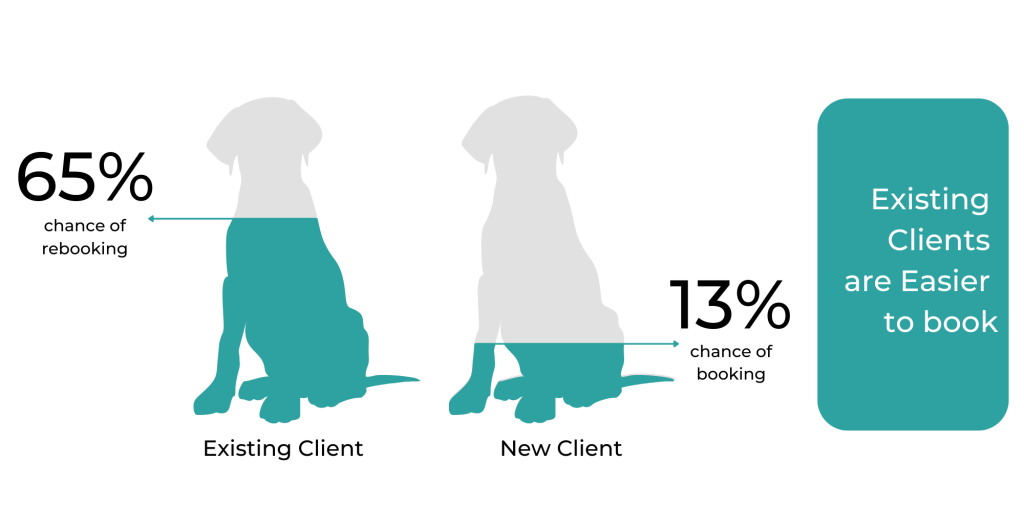
You might be thinking, “OK great, but how do I secure repeat weekly bookings?”
Pet parents are looking for convenience, and someone they can trust with their beloved pet. Here are some of the ways you can demonstrate you’re keen to establish a regular booking with a client:
- Throughout the first booking, keep in touch with the client via photos and SMS updates to show them how much fun their pet is having.
- After you’ve completed one booking, reach out to let them know you had a great time and would love to look after their pet again.
- In the lead-up to peak seasons – ie. Christmas, Easter, and School holidays – offering your services to existing customers first is a really great way of showing that you value their relationship and would love to care for their pets again.
Even if you haven’t had a booking for a little while, you can still reach out to previous clients. Here are some ideas to help start the conversation:
- It’s not unusual to want to see a pet again if really liked them and you haven’t seen them recently. Many pet parents appreciate hearing from their Pet Sitters and Dog Walkers. It shows that you care and puts you at the top of their mind when they need care again.
- Photos of a pet may pop up as a memory on your phone, or you may see something that reminds you of their furry friend. Share this memory with the client. They’ll feel the genuine care you have for their pet.
These actions and conversations don’t cost you anything. They simply help strengthen your relationship with existing clients and improve your chance of being booked again in the future.
Like most humans, we can fear rejection so won’t often do any of the above. However, all members of our community are pet lovers and will often reply because they love that you love their pet!
Why not reach out to one or two of your previous clients and start the conversation?
FAQs:
“How do I offer Repeat Weekly Bookings to my clients?”
In the Services and Rates section of your profile, within each service category (eg. Dog Walking), toggle the switch that aligns with the “Offer Repeat Weekly Bookings” option under your preferred service. Make sure to click “Save” to update this change in your profile settings.
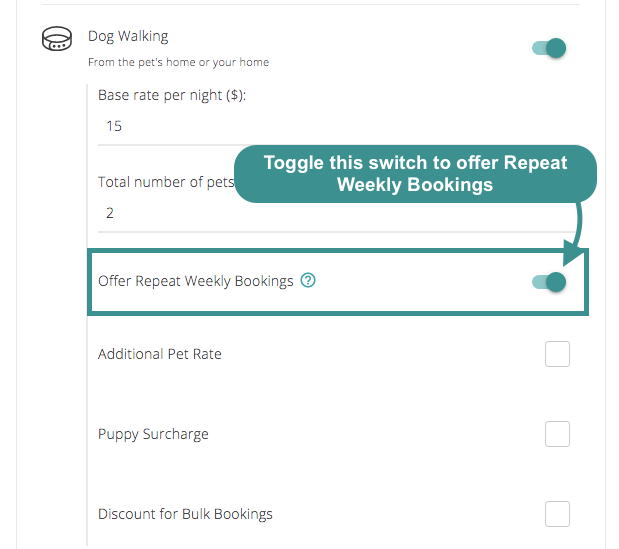
“I’m ready to approve my first Repeat Weekly Booking request. What happens now?”
Pawsome! So the first thing we advise is that you double-check every detail in your booking.
By opting into Repeat Weekly Bookings (RWBs), you agree to:
- The Repeat Weekly Booking Flexible Cancellation Policy Under this policy, a full refund (excluding any booking fee that may have already been paid) will only be available if the booking is cancelled before 12pm AEST, 24 hours prior to when the service is set to begin. If this cut-off time has passed, the Owner will be charged 50% of the full amount for the relevant service.
- Weekly Payments All Repeat Weekly Booking fees will be paid to you every week, 3 days after a week’s booking has concluded.
- Advance Bookings When a Pet Owner makes a Repeat Weekly Booking with you, our system will automatically block your Calendar for the chosen dates over the next month. When a week of your bookings have been completed, a new week of pre-approved bookings will be added to your Calendar.
“How can I make changes to a Repeat Weekly Booking?”
Are you looking to edit a Repeat Weekly Booking (RWB)? If so, you’ll need to finalise them before your client makes their first Repeat Weekly Booking payment. Prior to that first payment, you may edit:
- The starting week for the first Repeat Weekly Booking.
- The day/s of the week on which these bookings occur.
- The total weekly price for these bookings.
To find all of these options, simply look under Booking Details:
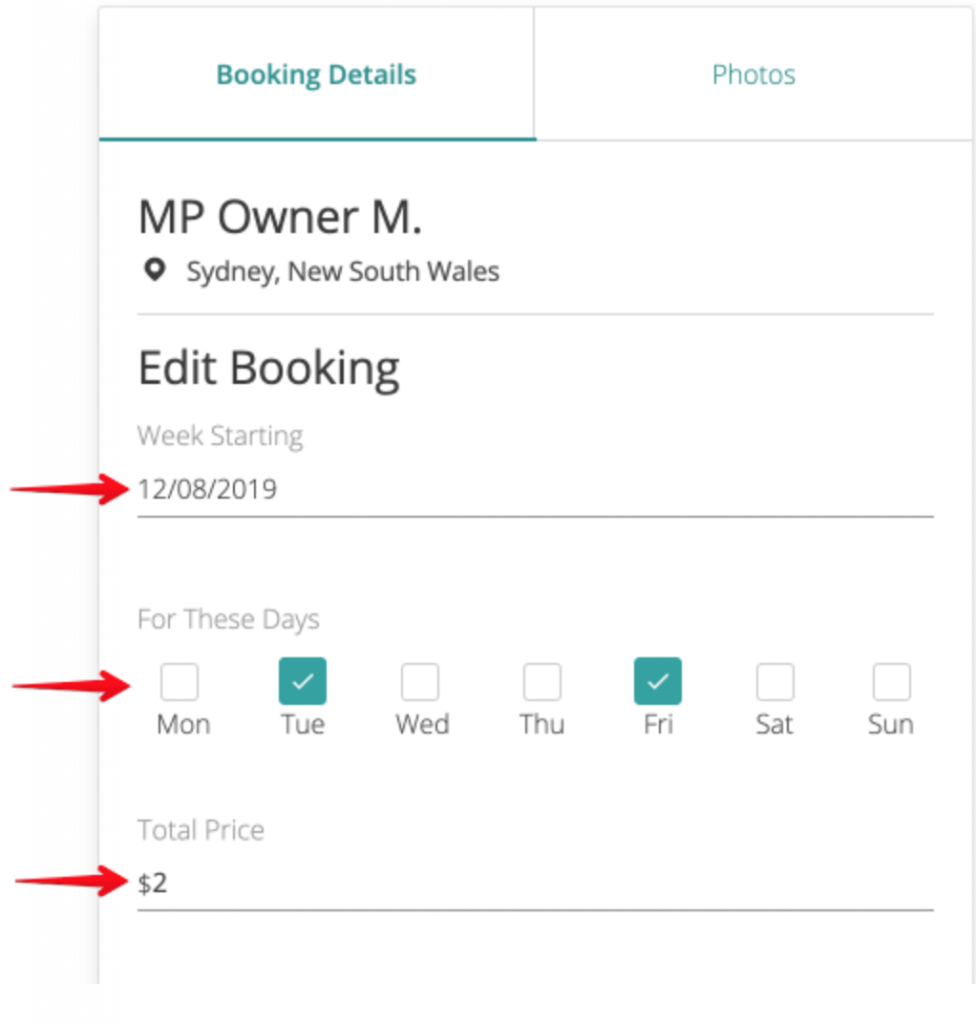
Do you need to make booking changes after your client has already made their first RWB payment?
To do so, you’ll need to cancel the RWB and schedule a one-off booking. This will let you make the changes you need – after which you can schedule a brand new RWB.
“If I need to, how can I cancel Repeat Weekly Bookings?”
To cancel your RWBs, you’ll need to:
- Go to your Bookings. From here, select the booking you would like to cancel.
- Provide your reason.
- Select “Cancel ALL Repeat Weekly Bookings”.
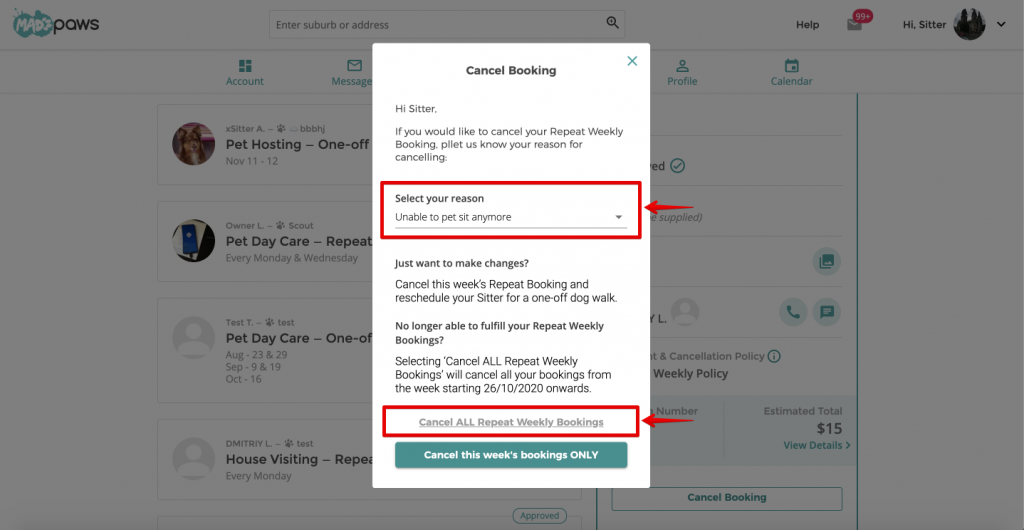
In the pop-up window, select “Yes, cancel” to confirm. This will cancel your RWBs.
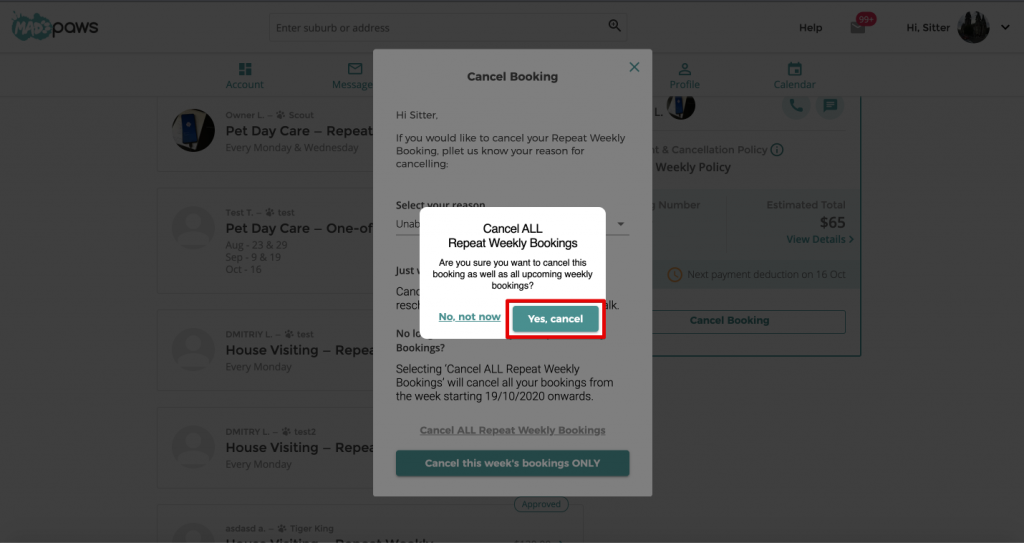
Your cancellation will take effect from the following week onwards, provided payment has not yet been made for that week’s booking. If you would like to cancel a specific week, contact service@madpaws.com.au
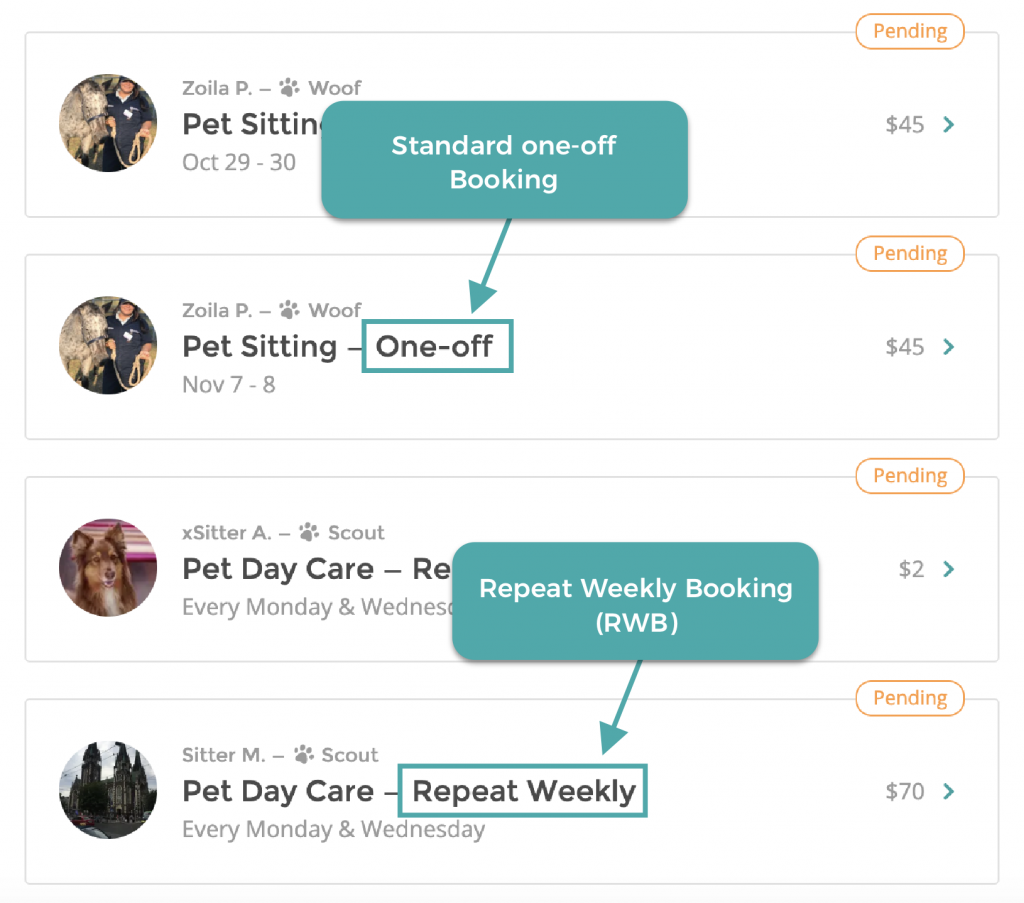
“I’ve just confirmed my first Repeat Weekly Booking. How can I distinguish my RWBs from my standard one-off bookings?”
When looking at your bookings, all you need to do is look for those two magic words: “Repeat Weekly”.
| Have more questions? Check out our Help Centre for a range of articles that provide more detail about Repeat Weekly Bookings (RWBs). You can also use our Live Chat feature there. too! |
We want to make your Mad Paws business as easy as possible. As they say, work smarter, not harder, right? We think repeat bookings are a puuuuurfect example in our world.

2 comments
How do you organise payment of bookings when you get a confirmed client whom wants your services.
Hi Louise,
Once a Sitter approves the Repeat Weekly Booking (RWB) owners will be asked to pay for the first week, the same process as one-off bookings.
Payment for the following weeks will be automatically charged to the owners’ credit card on the Friday before the next week of bookings is due to begin. More details can be found here.
Hope it’s been helpful.
Irina @ Mad Paws